



If you have connected to Wi-Fi at a hotel, airport, coffee shop, or shopping center, you have almost certainly encountered a captive portal: the sign-in page that appears before you can access the internet. Security researchers recently disclosed an attack technique known as CaptiveCrunch, which targets users at precisely this point in the connection process. Here is what CaptiveCrunch is, why it occurs, and why properly managed public Wi-Fi remains a safe and reliable way to stay connected.
CaptiveCrunch is a publicly documented attack technique that targets the captive portal experience most people encounter on hotel, airport, and coffee-shop Wi-Fi. When you join a public network, your device is briefly redirected to that portal so you can accept terms and conditions, enter an email, or log in. This redirection step is a completely normal, legitimate part of how guest Wi-Fi works.
CaptiveCrunch abuses that moment of trust. An attacker who has gained a foothold in a poorly secured network manipulates DNS responses, the lookups that translate a website name like "your-bank.com" into the numeric address your device connects to. By tampering with those lookups, the attacker can quietly redirect a guest to a fake copy of a real website, or to a bogus "system update" prompt, even though the guest did nothing wrong and believes they're on the real site.
Travelers are especially attractive targets. They connect quickly, often on unfamiliar networks, and they already expect a sign-in screen, which makes a fraudulent login page far more convincing than a random phishing email.
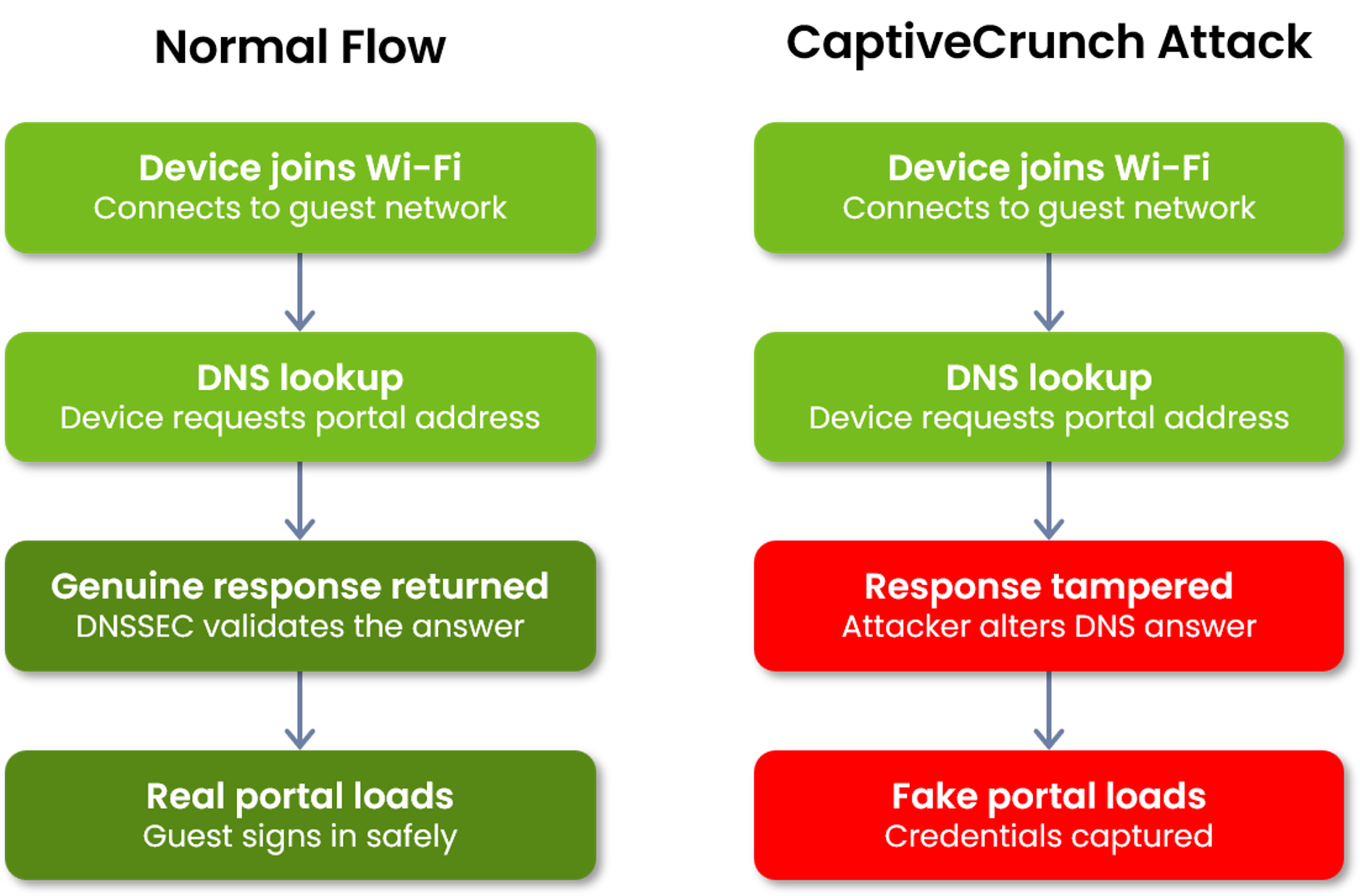
DNS hijacking happens because of a structural gap in how DNS was originally designed. DNS (Domain Name System) is effectively the internet's "address book": every time you visit a site, your device asks a DNS server for the address behind that name and trusts whatever answer comes back. The system was built decades ago for a smaller, more trusting internet, and it has no built-in way to prove an answer is genuine.
DNS hijacking is when an attacker supplies a false answer to that lookup. Instead of the real address, your device receives one pointing to attacker-controlled infrastructure, while your browser still shows the name you expected, so the fake page can look convincing at first glance.
DNSSEC (Domain Name System Security Extensions) adds a digital signature to DNS records, a tamper-evident seal. Systems that check this signature can confirm the address information is genuine and hasn't been altered in transit. If a DNS answer has been tampered with, a DNSSEC-aware system recognizes the mismatch and refuses to use it, instead of routing the guest to a fraudulent site.
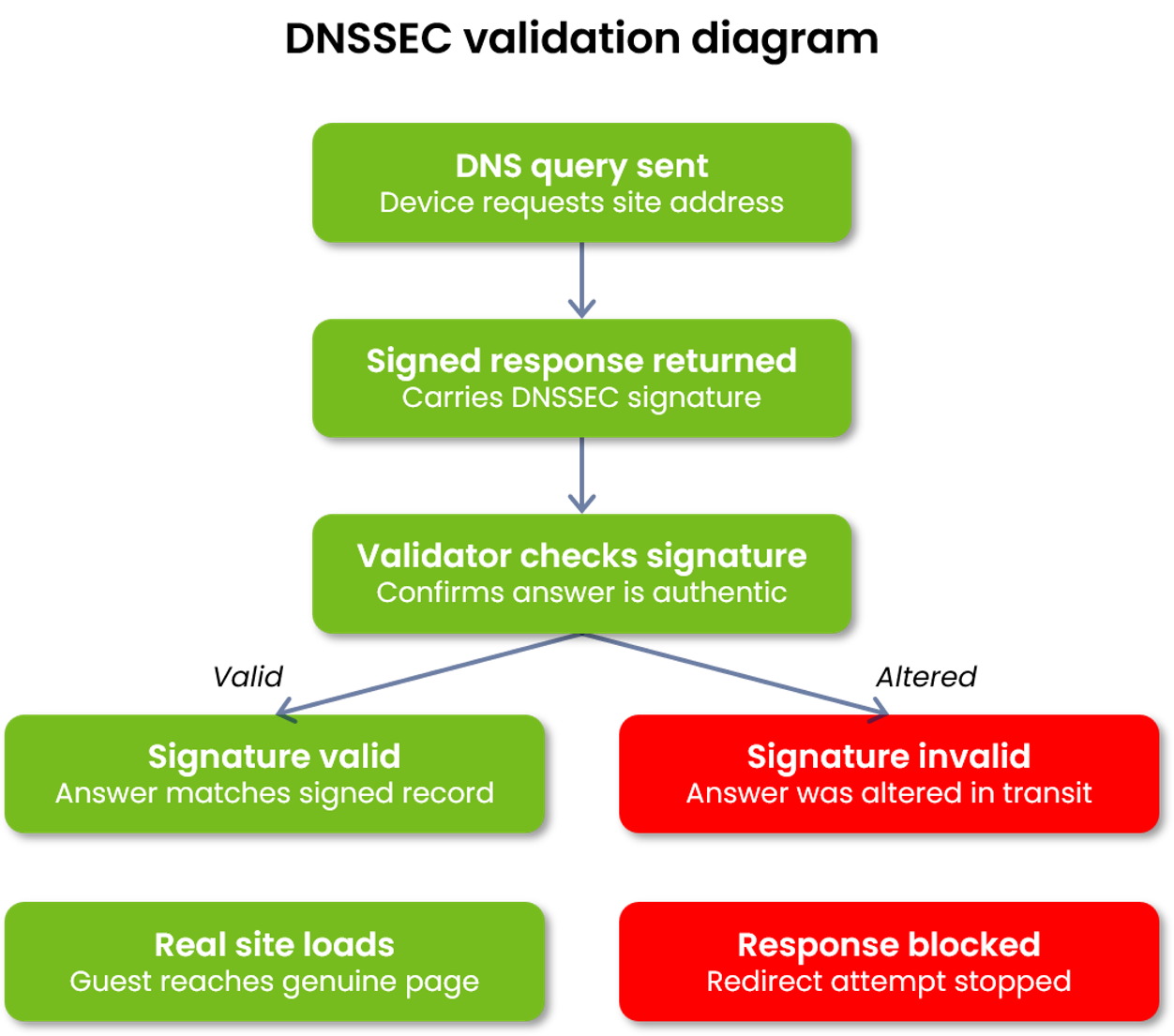
DNSSEC doesn't stop every possible attack, but it closes the specific door that DNS-hijacking techniques like CaptiveCrunch depend on.
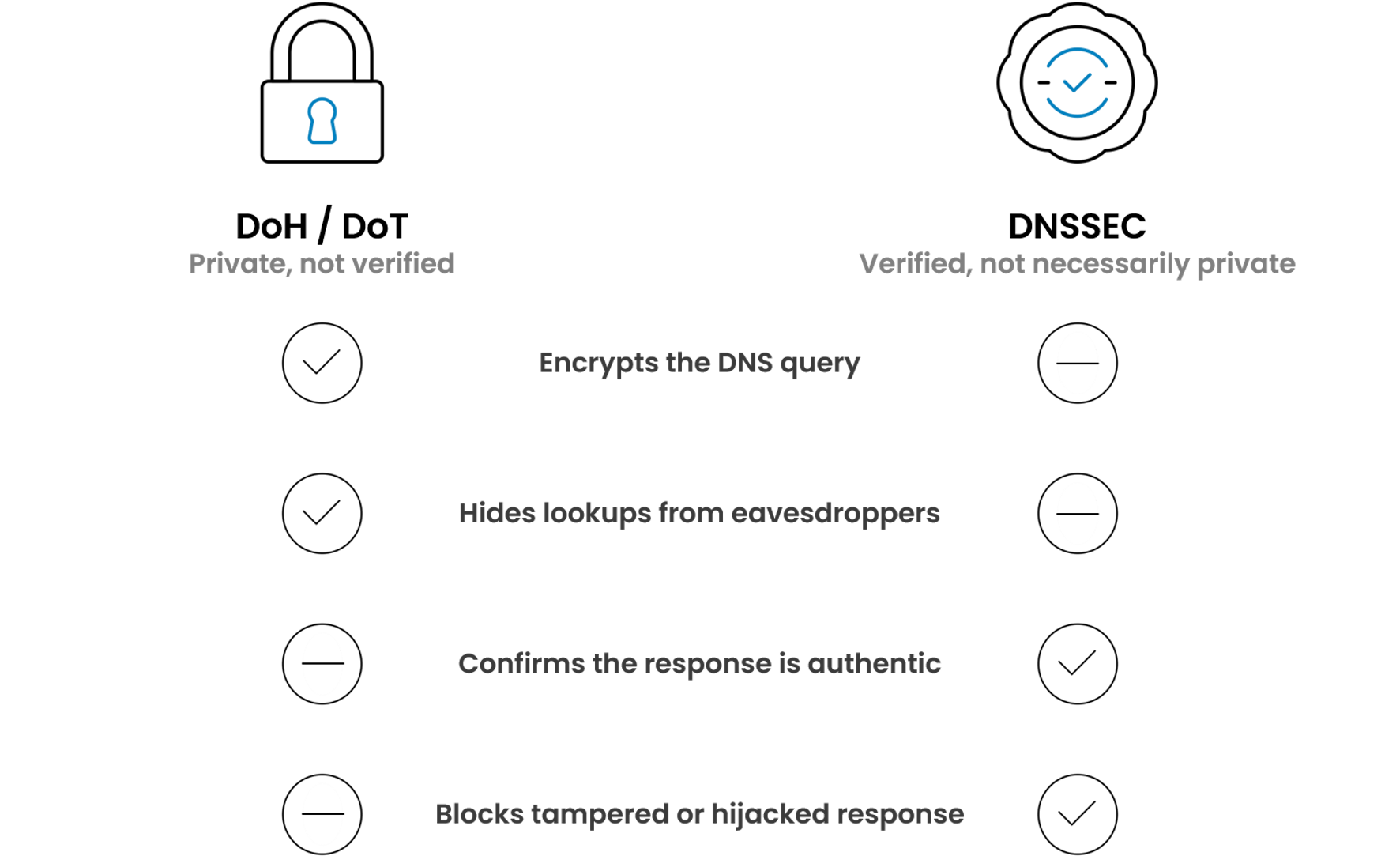
No. Encryption and authenticity solve different problems. DNS over HTTPS (DoH) and DNS over TLS (DoT) keep your DNS lookups private, so others can't easily see which sites you're visiting. But encryption only hides the conversation. On its own, it doesn't confirm that the answer you received is the real, unaltered one. A hijacked response can still travel over an encrypted channel.
When a redirect like this succeeds, the consequences are everyday risks worth understanding.
Think about the ordinary moments this affects: checking email before a flight, signing into a banking site from a hotel room, logging into a work tool between meetings, scrolling social media at a café. Each involves entering credentials, and each is a moment where knowing how these protections work helps you stay safe.
Datavalet builds security into the network and infrastructure itself, rather than leaving it to chance on each guest's device. Our approach is defense-in-depth: multiple overlapping layers working together to reduce risk.
No provider can promise absolute protection, and we won't claim otherwise. What we commit to is meaningful, layered risk reduction: designing networks to close off the most common attack paths before they reach a guest.
Security works best as a shared effort between providers and users. A few simple habits go a long way on any network:
Yes, public Wi-Fi remains a valuable, trustworthy service when it's properly managed. Techniques like CaptiveCrunch are a useful reminder of why DNS security and everyday vigilance matter, but they don't mean guest networks are inherently unsafe.
Modern security practices significantly reduce the risk. Properly managed public Wi-Fi networks that implement protections such as DNSSEC, secure network design, and sound operational discipline close off the very paths these attacks depend on, and remain a trusted, safe way for guests to stay connected. That works best as a shared effort: providers investing in secure infrastructure, and users following a few sensible habits.
Datavalet designs, operates, and secures managed guest Wi-Fi networks. We invest in secure network design, DNS security, and operational best practices so guests can connect with confidence.

Every organization is unique. Our experts will work with you to design the right mix of products and services for your needs, from multi-site deployments to enterprise-scale rollouts.


.svg)